
How to Create Package in SAP ABAP | Step-by-Step Tutorial
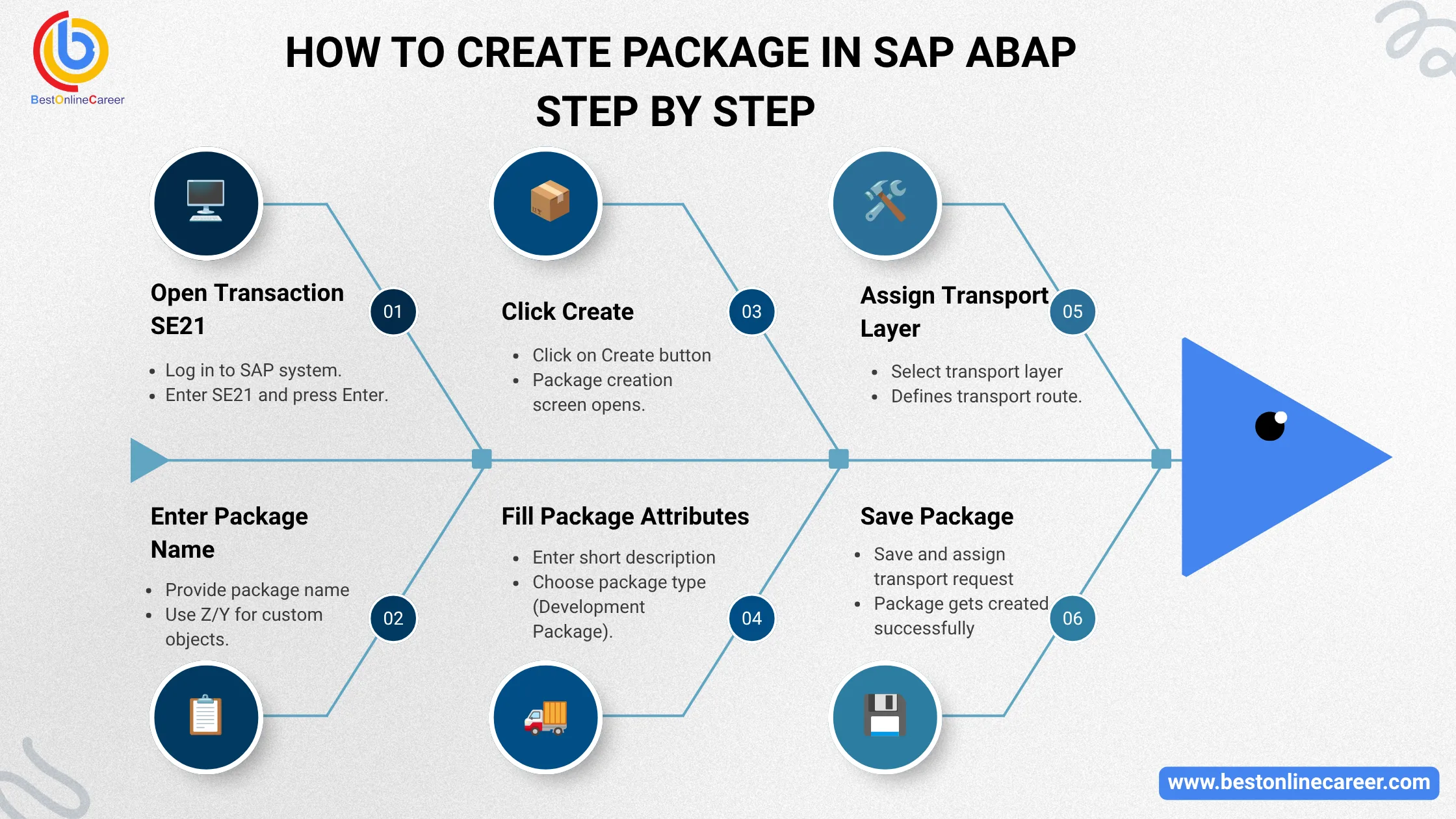
How to Create Package in SAP ABAP Step by Step
SAP ABAP development involves creating many objects, including classes, programs, modules tables, reports, and tables. To arrange these development objects effectively, SAP uses Packages. If you're a SAP novice or an aspiring developer, learning how to build packages within SAP ABAP can be one of the most important abilities you need to master.
In this article we will go over how to build packages within SAP ABAP step by step how to create packages, the reasons why they are crucial, what types of packages Best practices, and the most common mistakes that developers must beware of.
What is a Package in SAP ABAP?
The term "package" refers to a package that is part of SAP ABAP, it's a container that allows you to group and organize similar development objects. Packages allow developers to manage objects in a logical way and also move them across SAP systems.
SAP packages can include:
- Reports
- Function Modules
- Classes
- Smart Forms
- Interfaces
- Tables
- Enhancements
- Web Dynpro Components
- CDS Views
In simple terms, they aid in maintaining a well-organized SAP environments for development.
Why Are Packages Important in SAP ABAP?
Before figuring out how to build packages within SAP ABAP, it is crucial to know why packages are created.
Benefits of SAP ABAP Packages
1. Better Organization
Packages link related objects to facilitate maintenance.
2. Transport Management
Packages are tied to transport requests, which transport objects from one system to another.
3. Reusability
The objects inside packages can be reused in different projects.
4. Access Control
Visibility and authorization can be controlled at the package level.
5. Simplified Development
Large SAP projects can be managed with the right package structure.
Types of Packages in SAP ABAP
SAP typically offers two packages categories:
| Package Type | Description |
|---|---|
| Local Package | They remain within the local systems and aren't transportable |
| Transportable Package | It is possible to transport objects across SAP systems. |
Prerequisites Before Creating a Package
Before you build a package in SAP ABAP make sure that you're able to:
- Access to SAP GUI
- Developer authorization
- Access to the SE21 transaction
- Transport request authorization
- The guidelines for Naming Conventions from your company
How to Create Package in SAP ABAP Step by Step
Let us now look at the entire procedure of how to create a package in SAP ABAP step-by- stage.
Step 1: Open Transaction SE21
SAP offers transaction codes SE21 specifically designed for the creation of packages and maintenance.
Navigation:
- Log in to the SAP system
- Enter the transaction Code: SE21
- Press Enter
You will be able to see the Screen for Package Builder.
Step 2: Enter Package Name
In the field of Package:
Name your package as you would like it to be.
Example:
Z_BOC_TRAINING
SAP custom objects typically begin with:
- Z
- Y
Avoid using SAP standard namespaces.
Step 3: Click Create Button
After entering the name of the package:
- Select on the "Create button
SAP will display the screen for creating packages.
Step 4: Fill Package Attributes
Please provide the information required.
Required Fields
Short Description
Provide meaningful description.
Example:
SAP ABAP Training Package
Superpackage
Optional field for the hierarchy.
Example:
Z_BOC_MAIN
Package Type
Choose:
- Development Package
- Structure Package
Most developers employ Development Package.
Step 5: Assign Transport Layer
If you are creating a package with transportability:
- Select the right layer for transport.
Example:
ZDEV
Transport layer determines system transport routes.
If you're not sure, consult the SAP Basis team.
Step 6: Save the Package
Select the save icon.
SAP will now be asking for:
Transport Request
Choose:
- Current request
- OR
- Create a new request
Step 7: Package Successfully Created
After saving successfully:
- Package is designed
- It is made available for the assignment of development objects
You can use this program to create:
- Programs
- Classes
- Tables
- Function Modules
How to Create Local Package in SAP ABAP
Sometimes, developers design local objects that don't require transport.
To this end:
Use the package:
$TMP
The SAP Local program.
Ready to Start Your Learning Journey?
Join thousands of learners and build your future with expert-led courses and 100% practical training.
Expert Guidance
Learn from industry experts
Trusted & Recognized
Top-rated by learners
Flexible Learning
Online options
Placement Support
Career support & more
Features of Local Package
- Non-transportable
- Tested for accuracy
- Ideal for environments of practice
Difference Between Local Package and Transportable Package
| Feature | Local Package | Transportable Package |
|---|---|---|
| Transportable | No | Yes |
| Package Name | $TMP | Z* or Y* |
| Used For | Testing | Real Projects |
| CTS Integration | No | Yes |
Best Practices While Creating Packages in SAP ABAP
Knowing how to create packages within SAP ABAP is essential, but the following of the best practices is equally important.
1. Use Proper Naming Standards
Example:
Z_SD_REPORTS Z_MM_INTERFACES
Beware of generic names.
2. Maintain Logical Structure
Make separate packages for:
- Reports
- Interfaces
- Enhancements
- Forms
3. Avoid Too Many Objects in One Package
Larger packages are difficult to keep clean.
4. Use Superpackages
For enterprise projects:
- Create hierarchy
- Maintain modular design
5. Document Package Purpose
Always maintain clear descriptions.
Common Errors While Creating Package in SAP ABAP
Developers are often faced with issues when making packages.
Error 1: No Authorization
Cause:
Missing developer access.
Solution:
Contact the SAP Security team. SAP Security team.
Error 2: Invalid Transport Layer
Cause:
Incorrect configuration for transport.
Solution:
Contact the Basis team.
Error 3: Namespace Conflict
Cause:
Utilizing SAP Standard names.
Solution:
Make use of Z or Y as a prefix.
How to Assign Objects to Package
Once the package has been built:
- Create an ABAP object
- When you the time of saving
- Enter the package name
SAP automatically connects object to the package.
How to Display Existing Packages in SAP
Use the transaction:
SE21
OR
SE80
You can:
- View the hierarchy of the package
- Analyze objects in the contained
- Modify package details
Real-Time Example of SAP ABAP Package Structure
An example of a hierarchy for enterprise packages:
Z_BOC_MAIN
|-- Z_BOC_REPORTS
|-- Z_BOC_INTERFACES
|-- Z_BOC_FORMS
|-- Z_BOC_ENHANCEMENTS
This helps improve project scalability.
Advantages of Proper Package Management
The proper management of packages is beneficial to organizations:
- Improve SAP development standards
- Reduce maintenance time
- Reduce the complexity of transport
- Facilitate team collaboration
- Enhance the system's organization
SAP ABAP Package Transactions
| Transaction Code | Purpose |
|---|---|
| SE21 | Package Builder |
| SE80 | Object Navigator |
| SE09 | Transport Organizer |
| SE10 | Transport Management |
Frequently Asked Questions
What's the significance of package SAP ABAP?
Packages are used to organize closely related SAP development objects, and aid in transfer them between systems.
Which transaction is used to create package in SAP ABAP?
Code for transaction:
SE21
can be used to make packages.
What is $TMP in SAP ABAP?
$TMP is a local application that is used to transport non-transportable objects.
Can we change package later in SAP?
It is true that SAP objects are able to be assigned to various packages with options for changing packages.
What is superpackage in SAP ABAP?
A superpackage is a the parent package to help create hierarchical structure of packages.
Final Thoughts
The process of learning how to create packages in SAP ABAP step-by-step is essential for each SAP ABAP developers. Packages aid in maintaining a well-organized development and proper transportation management and allow for scalable SAP design architecture.
No matter if you're just beginning your journey taking a course in SAP ABAP or an experienced consultant who manages enterprise developments Understanding the process of creating packages is crucial to the success of SAP implementations.
Following the steps outlined in this article it is easy to develop a package in SAP ABAP in order to also maintain professional SAP standards for development.
Related SAP ABAP Topics
- SAP ABAP Reports
- ALV Reports in SAP ABAP
- Module Pool Programming
- Function Modules
- BADI and BAPI
- Smart Forms
- SAP ABAP on HANA
- Object-Oriented ABAP
- SAP Enhancement Framework
Learn SAP ABAP Online
If you're looking for hands-on SAP ABAP training using real-time applications Explore professional SAP ABAP classes from the Best on the Web and grow your SAP career by gaining knowledge that is relevant to your industry.
Related SAP Training Courses
Tags
Share this article
Help others discover this valuable SAP content


